2. サンプルスキーマ(HR)を作成する#
サンプルスキーマのダウンロード#
本デモでは、HRスキーマを作成します。
サンプルスキーマは、GitHubで公開されている こちらのリンク よりファイルをダウンロードします。
> GitHubレポジトリ:oracle-samples/db-sample-schemas
まず、次のコマンドでスキーマファイルをダウンロードします。
wget https://github.com/oracle-samples/db-sample-schemas/archive/refs/tags/v23.3.zip
ダウンロードが完了したら、 v23.3.zip を解凍します。
unzip v23.3.zip
解凍後、 db-sample-schemas-23.3 が展開され、その中にある /human_resources/hr_install.sql を実行します。
ファイル名が異なる場合がありますので、お手元の環境に合わせてファイル名とパスを確認してください。
なお、サンプルスキーマの詳細については こちら をご参照ください。
サンプルスキーマを作成する#
HRスキーマを作成するために、まずDBに接続します。
# oracleユーザーにスイッチ
$ sudo su - oracle

# SYSユーザーでDBに接続
$ sqlplus / as sysdba
次に、現在のコンテナを確認し、 FREEPDB1 に接続します。
-- pdbを確認し、freepdb1に接続
SQL> show pdbs
SQL> alter session set container = FREEPDB1;
SQL> show con_name
続いて、先ほどダウンロードした、 db-sample-schemas-23.3/human_resources/hr_install.sql を実行します。
SQL> @/home/oracle/db-sample-schemas-23.3/human_resources/hr_install.sql
インストールが開始され、パスワードの入力を求められますので、HRユーザーのパスワードを入力します。
Thank you for installing the Oracle Human Resources Sample Schema.
This installation script will automatically exit your database session
at the end of the installation or if any error is encountered.
The entire installation will be logged into the 'hr_install.log' log file.

Enter a password for the user HR: <HRユーザーのパスワードを入力>

Enter a tablespace for HR [USERS]:  <HRユーザーのパスワードを再入力>
Do you want to overwrite the schema, if it already exists? [YES|no]: YES
******  Creating REGIONS table ....
...
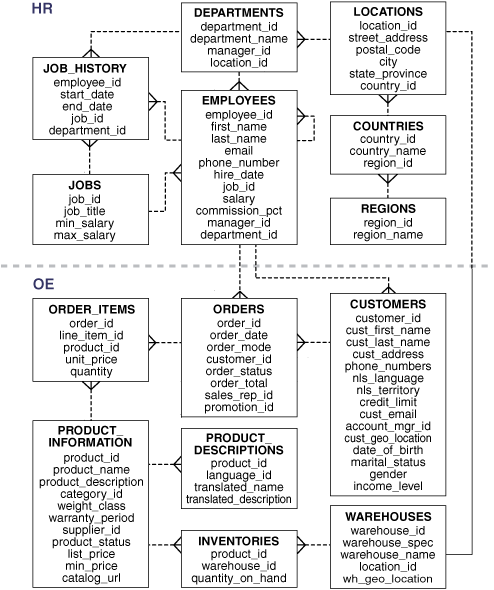
インストールが完了したら、HRスキーマが正しく作成されていることを確認します。
SQL> select table_name from all_tables where owner = 'HR';
結果は以下のようになります。
TABLE_NAME
--------------------------------------------------------------------------------
COUNTRIES
REGIONS
LOCATIONS
DEPARTMENTS
JOBS
EMPLOYEES
JOB_HISTORY

7 rows selected.
また、参考までに HRスキーマの構成は以下のようになっています。